I'm working on multiple personal projects on my development server. All the specs and tickets are written, and I am able to complete chunks of work from my mobile phone running a simple command like this one: /implement ticket 08.
My coding agents don't live on my laptop. They live on a small rented server that's always on, and I pick them up from whichever device I have. On my Mac, I run a single command and end up in the same workspace where I left off. This is the always-on agentic development setup I have today.
Whenever people talked about how they ship with agents, I asked what their setup looked like, and I rarely got a real answer. So I started looking into it. At the same time, multiple projects caught my attention, and it crossed my mind that they could work very well together for this setup.
I bought a Hetzner server and worked out the rest myself. It took some work and I hit a few snags, so I'm sharing what I ended up with. I've run it for a little under a month, and it's the first time in almost a year of using coding agents that I've shipped personal projects mostly hands-off.
It's three tools, and each one closes a specific gap:
- Hetzner: a cheap server that's always on, so the work doesn't depend on my laptop.
- herdr: a terminal that keeps agents alive and lets me reach them from any device.
- Matt Pocock's skills: a workflow that splits the work into what I drive by hand and what I delegate fully.
I run Claude Code, but the setup works with any agent that runs in a terminal. Let's dive into each of them and a basic setup guide.
1. Hetzner: the always-on machine
I bought the cheapest Hetzner server with 4 GB of RAM, 40 GB disk space and 2 vCPUs for under $10/month (€6.59/month). A Mac is faster, but I don't want to keep mine awake and draining battery, and I don't want my agents to depend on it.
Treat a new server's public IP as hostile. Scanners find a fresh machine within minutes, so harden it before you install anything. The concept is simple:
- A normal user with sudo, and SSH keys only: no passwords, no root login.
- A firewall that drops everything except SSH.
- fail2ban for noisy IPs and automatic security updates.
- A snapshot before each risky change, and a second SSH session open the whole time, so a config mistake can't lock you out.
Check the config SSH is actually using, not the one you think it's using. Ubuntu cloud images can quietly override your settings. I believed passwords were off until I logged in with one.
You don't have to do this by hand. I did, talking it through with Grok and coding agents, because I wanted to understand every step. Looking back, the hetzner-codex-remote skill covers most of it. Skim it so you know what it does, then run it. It's written for Codex remote, so swap in Claude Code and your own username. Or hand your agent a prompt like this:
Harden this fresh Ubuntu VPS for remote coding agents. Create a non-root sudo user with my SSH public key, disable root login and password auth, enable UFW (deny incoming, allow SSH), and add fail2ban and unattended-upgrades. Verify the effective sshd config with
sshd -Tand confirm a password login fails before you finish. Keep my current SSH session open the whole time.
Then install your agent on the server and sign in.
2. herdr: agents that don't die
herdr is a terminal multiplexer built for coding agents. Think tmux, but simpler. You get workspaces, tabs and panes, you can click around with a mouse, and the keybinds are ones I actually remember. I tried tmux once and never got the shortcuts to stick. From my machine I run herdr --remote monday and I get into this workspace.
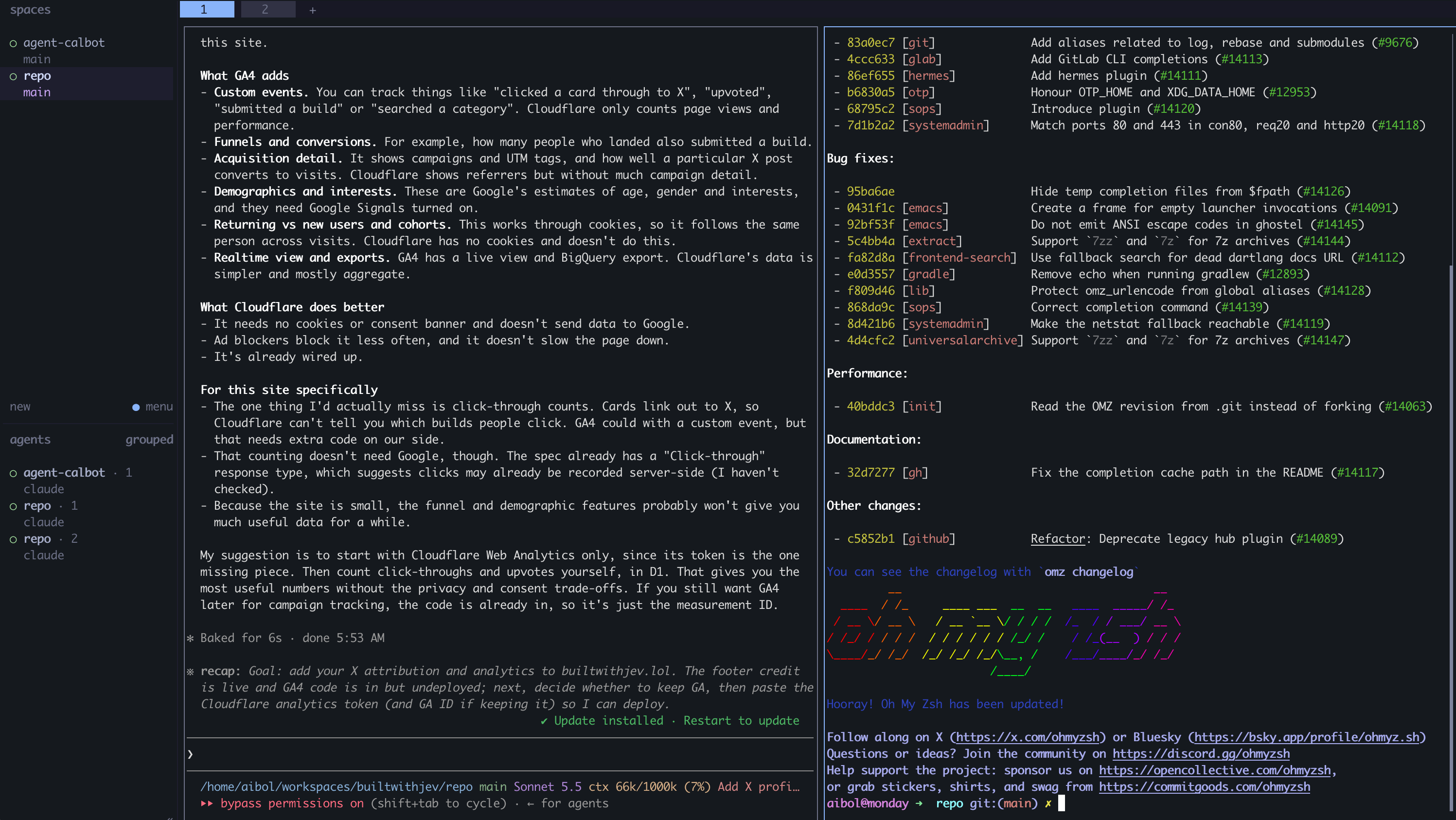 My herdr workspace: two panes side by side, each running its own agent
I figured my herdr setup looks like the one you usually see people using: multiple panes and parallelising their work.
I use it for three reasons:
- Agents keep running when I disconnect. I close the laptop or lose the connection, and nothing stops.
- It's easy to manage several workspaces and agents, and I can click between them.
- I land in the same workspaces from any device.
Setup takes a few minutes:
- On the server, install it with
curl -fsSL https://herdr.dev/install.sh | shand runherdr. - Add an alias for the server to
~/.ssh/config. - From your laptop, connect with
herdr --remote <alias>. Detach withctrl+b qand the panes keep running. - Start your agent in a pane. For Claude Code, run
/remote-controland the session shows up in the Claude app on your phone.
When working on many things, you will eventually be limited by your server capacity. On 4 GB, two agents run fine. At three or four, memory gets tight, and anything else on the server may get shut down.
3. Matt Pocock's skills: hands-on where it matters
An always-on setup doesn't ship anything by itself. You'd still be typing big prompts into a phone. I needed a system, and I found it in Matt Pocock's skills. They aren't the only option. My real point is to pick a system and put it into use.
What these skills give you is alignment. Tell an agent to build something and it makes decisions you didn't want, and the project drifts. These skills make you agree on the destination first. Install them with npx skills@latest add mattpocock/skills.
Here's how I use them:
/grill-with-docsstarts every new project. I give it my idea, vague or detailed, and the agent interviews me about tech stack, server, database and more. Most questions come with options, so they're quick to answer, and it records the decisions in docs in the repo. I stop it when I feel aligned./to-specturns that conversation into a written spec./to-ticketssplits the spec into small tickets. I keep them as files in the repo rather than in a tracker, to avoid overcomplicating things.- I clear the session. Don't run an agent on a half-full context window. My rule of thumb is to stay under 10–20%.
/implementis my favorite. Point it at a ticket and it reads the spec, builds test-first, reviews the diff against your standards and the spec, and gives me a report. I review, commit, clear, and move to the next ticket.
I do steps 1 to 3 on my Mac, because that's where my decisions matter. However, I started doing this on mobile too for new features. Step 5 is the loop I run from anywhere. The skills page covers the rest of them, start to finish.
What this setup has shipped
So far I've felt productive with this setup and have been able to make progress and ship 2 things:
- builtwithjev.lol: a simple directory of projects built with Jev.
- A calendar assistant agent: I send it any message, and it creates events and tasks in my calendar. I run it for myself and I'm still adding features.
These are my playground for running this setup, and they are also turning out to be projects I wanted to ship. They are driven mostly hands-off and, as Matt Pocock puts it, by "AI Skills for Real Engineers", so I wouldn't just call them vibe-coded apps.
Build yours
- Get a small server and harden it: skim the skill or use the prompt above.
- Install your agent and sign in.
- Install herdr, add an SSH alias, connect with
herdr --remote <alias>. - Turn on your agent's remote option so your phone can reach it.
- Install the skills: grill, spec, tickets, clear, then implement one ticket at a time.
The tools matter less than having a system. Split your work into decisions you make and execution you delegate, then put the setup somewhere you can reach from anywhere. Whether you have five minutes or a free afternoon, you pick up exactly where the agents left off.
This post first appeared on X.
